

Key Takeaways
- As of April 20, 2026, Airbnb’s Terms of Service explicitly ban AI-generated, AI-enhanced, and synthetic evidence in all damage claims. That includes AI-upscaled photos and AI-written damage summaries.
- You have 14 days from checkout (or before the next guest checks in, whichever comes first) to file a damage claim through AirCover. Missing this window is the top reason valid claims get denied.
- Tools like TurnoverBnB and Minut produce timestamped, reservation-linked inspection records and incident logs that Airbnb’s resolution center recognizes as legitimate third-party evidence.
- A pre-arrival video walkthrough and a checkout walkthrough, shot in the same sequence with native camera timestamps, is still the foundation of any successful damage claim.
- The hosts who win damage claims most consistently submit evidence that tells a clear before-during-after story, not just a photo dump.
Airbnb updated its Terms of Service on April 20, 2026 and banned AI-generated evidence from all damage claims. Submit an AI-enhanced photo, a synthetic receipt, or anything assembled by a ChatGPT session and Airbnb will reject it. Full stop.
That change answered the question of what hosts cannot do. It left open the bigger question: what should you be doing instead?
This is the practical answer. Which documentation tools hold up, how to build a workflow that works before anything goes wrong, and how to submit a claim that Airbnb’s resolution center actually processes under the new rules.
What Airbnb’s Resolution Center Actually Accepts in 2026
Let’s start with the specific list. Airbnb’s resolution center explicitly recognizes these as legitimate evidence:
- Timestamped photographs
- Video walkthroughs
- Professional repair or cleaning estimates
- Receipts showing replacement cost
- Written admissions from the guest in the Airbnb message thread
- Smoke or CO detector readings
- Before-and-after photo or video trails
The word Airbnb keeps using is “verifiable.” Their updated language requires documentation that can be traced to a specific time, a specific device, and a specific location. AI-generated images fail that test automatically. An AI-enhanced photo of a stained couch has no device metadata, no GPS coordinates, no camera ID. There is nothing to verify.
That’s the core of the ban. Understanding what makes evidence verifiable is now the most important skill a host can develop around damage claims in 2026.
The 14-Day Window: Your Most Important Deadline
Airbnb’s timeline is strict. You have 14 days from the guest’s checkout date to file a damage claim through AirCover. Or before the next guest checks in, whichever comes first.
Miss that window and the claim is gone. It doesn’t matter how much damage there is, how clear the photos are, or how credible the evidence. A missed deadline is the number one reason valid claims get denied.
There’s a secondary deadline too. Once you file, you have 30 more days to escalate to Airbnb if the guest doesn’t respond or agree to pay. That second clock starts the moment you submit, not the moment the guest sees it.
Write both dates on your calendar for every single checkout. Waiting until you discover the damage is already a problem. The inspection needs to happen fast.
Build Your Documentation System Before Anyone Arrives
The hosts who consistently win damage claims do one thing: they document before the guest ever unlocks the door.
A pre-arrival video walkthrough creates your baseline. Walk every room, every wall, every appliance. Hit the exterior too. Do it in one continuous shot with your phone’s native camera app. The timestamp and device metadata embed automatically into the file. That metadata survives when you upload to Airbnb’s resolution center. It’s part of the evidence, not an annotation you add later.
Same thing at checkout. Same rooms, same sequence, same continuous shot. Any damage visible in the checkout video that was not visible in the pre-arrival video becomes your claim. That comparison is what Airbnb’s review team is looking for: a clear before-and-after.
If you manage multiple properties, build this into every turnover as a fixed step. The two-minute walkthrough video is one of the highest-return habits you can add to your operations right now.
One practical note: don’t compress or re-upload these files through messaging apps. WhatsApp and Instagram strip metadata. Send the original file directly or back it up to Google Photos, iCloud, or Dropbox right after recording. The metadata needs to survive intact.
Third-Party Tools That Produce Auditable Evidence
Phone walkthroughs are the foundation. But the hosts building the most defensible documentation in 2026 go a layer deeper. They use tools that create timestamped, reservation-linked records that stand on their own.
Three tools stand out right now.
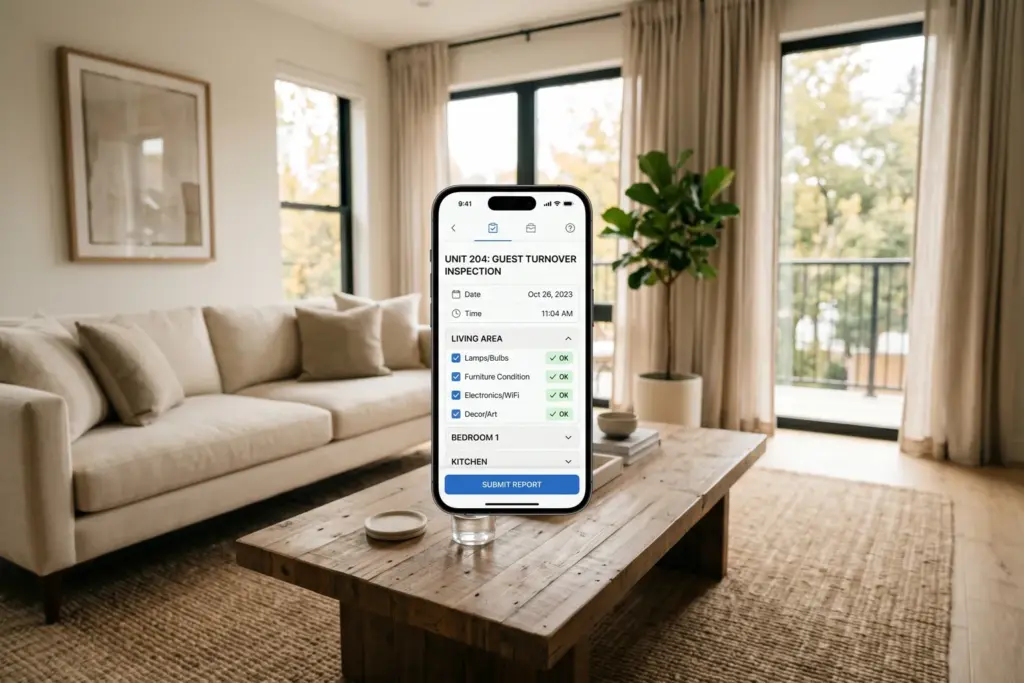
TurnoverBnB Inspection Reports
TurnoverBnB was built for cleaning coordination. Its inspection module has quietly become one of the most useful damage documentation tools available to STR hosts. We’ve covered how TurnoverBnB stacks up against Turno and ResortCleaning. If you haven’t set up a structured inspection workflow yet, that comparison is a good starting point.
Each TurnoverBnB inspection creates a timestamped report with photos, condition notes, and problem flags. Reports are linked to specific reservations in the calendar. When you export one as part of a damage claim, Airbnb can see exactly when the inspection happened relative to the guest’s checkout. It’s not just a photo. It’s a photo attached to an inspection record attached to a specific reservation date.
That’s a different category of evidence than a photo you texted yourself. The audit trail connects the documentation to the stay in a way that a standalone image simply cannot.
Minut Incident Reports
Minut is a noise and occupancy sensor. Its incident reporting feature has become genuinely useful for damage claims beyond noise disputes. We recently tested Minut against NoiseAware and Party Squasher for STR hosts. It’s the most export-ready platform when documentation quality matters.
When Minut detects a noise event, an occupancy spike, or cigarette smoke during a stay, it generates an incident report with timestamped event logs. Those logs establish exactly when something happened inside the property and who was there.
If a guest claims they were barely present, Minut’s occupancy data says otherwise. If they argue the damage was pre-existing, noise and occupancy logs from within their stay help build the timeline. Minut’s data has been accepted by insurance companies, local governments, and Airbnb support teams as supporting documentation.
The export format matters here. A raw data file is not the same as a formatted incident report with your property address on the header. Minut’s incident reports are designed for third-party review. That design choice pays off when a claims reviewer at Airbnb is processing a high volume of submissions.
NoiseAware
NoiseAware works on similar principles. Its noise event logs are timestamped and exportable. The company markets directly to STR hosts who need documented records for insurance claims, platform disputes, and neighbor complaints. The data format is clean and readable, which matters when Airbnb’s review team is working through a queue.
Both Minut and NoiseAware work best as supporting evidence. They don’t replace the pre-arrival and checkout walkthroughs. They add a second data source that corroborates your timeline from inside the property, without you needing to be present.
How to Submit a Claim That Gets Processed
Airbnb’s resolution center works. It just requires you to communicate in a specific way.
Be specific about costs. Don’t estimate. Submit actual receipts or professional repair and cleaning estimates with line items. “The couch was damaged” gets you nowhere. “Couch cushion torn along seam, replacement estimate $385 from ABC Furniture Repair, dated receipt attached” gets you somewhere.
Sequence your evidence before you upload. Lead with the pre-arrival walkthrough. Follow with the checkout walkthrough. Add third-party logs from Minut or TurnoverBnB if you have them. Attach receipts last. The claims team reviews multiple submissions at once. Make the before-during-after story easy to follow in order.
Include the message thread. If the guest acknowledged the damage in any Airbnb message, even indirectly, screenshot it and include it. Guest admissions are weighted heavily. They move a claim from “disputed” to “supported” quickly.
Keep your language factual. A timeline of documented events is more useful than a paragraph expressing frustration. The claims team needs to understand what happened, when, and what it cost. Give them exactly that, in plain language.
The Direction This Is All Heading
I spend a lot of time tracking platform patents and roadmaps. It’s a habit I can’t shake. And the direction here is clear: Airbnb is building automated verification infrastructure into its claims pipeline.
The AI leadership hire earlier this year (Ahmad Al-Dahle, previously VP of AI at Meta) is focused on discovery and personalization. But the same computer vision and metadata-matching systems apply directly to claims verification. Picture the near-future workflow: you upload your pre-arrival walkthrough and your checkout walkthrough, and the platform automatically flags visual differences between the two timestamps. That’s applied computer vision. Airbnb has both the engineering capacity and the business incentive to build it.
Going forward, hosts who have already built a systematic documentation workflow will slot directly into that future without changing anything. The tools exist right now. Most cost less per month than a single successful damage claim is worth. The argument for setting up the system before something goes wrong is only getting stronger.
Sponsored — OfferMarket
Buy Your First STR With Long-Term Rental Financing
Flexible, long-term financing for short-term rental buyers. Rates from 5.75%. Instant online quote, no credit pull.
Explore RTL Financing Options →Affiliate disclosure: StaySTRA may earn a referral fee.
Frequently Asked Questions
What evidence does Airbnb accept for damage claims in 2026?
Airbnb accepts timestamped photographs and video walkthroughs, professional repair or cleaning estimates with receipts, written admissions from guests in the Airbnb message thread, smoke or CO detector readings, and third-party inspection reports from tools like TurnoverBnB. As of April 20, 2026, AI-generated, AI-enhanced, or synthetic images are explicitly banned. All evidence must be verifiable and traceable to a real device, time, and location.
How long do I have to file a damage claim on Airbnb?
You have 14 days from the guest’s checkout date to file a damage claim through AirCover, or before the next guest checks in, whichever comes first. Once you file, you have 30 additional days to escalate to Airbnb if the guest does not respond. Missing the 14-day initial window is the most common reason valid claims get denied.
Can TurnoverBnB inspection reports be used as evidence in Airbnb damage claims?
Yes. TurnoverBnB inspection reports are timestamped and linked to specific reservations, so Airbnb can verify when the inspection happened relative to the guest’s checkout. Exported reports include condition photos, notes, and problem flags tied to a specific stay. This reservation-linked audit trail is stronger evidence than standalone photos because it establishes a clear chain of custody for the documentation.
Can Minut or NoiseAware data support an Airbnb damage claim?
Yes, as supporting evidence. Minut’s incident reports include timestamped noise event logs, occupancy data, and smoke detection events tied to specific stays. These logs can establish a guest’s presence during the damage window or document behavior patterns during the stay. Minut’s exported incident reports have been accepted by insurance companies and Airbnb support teams. NoiseAware produces similar exportable logs.
Why did Airbnb ban AI-generated evidence in damage claims?
The ban followed documented cases of hosts submitting AI-generated or AI-enhanced photos to support fraudulent damage claims, including at least one New York City case involving a claim worth roughly $16,000. Airbnb’s updated Terms of Service, effective April 20, 2026, define legitimate evidence as documentation verifiable and traceable to a real device, time, and location. AI-generated images have no authentic metadata and cannot be independently verified.
We do our best to keep our tech reviews accurate and up to date, but products evolve fast and we are only human. Always verify current features and pricing directly with vendors before purchasing.
Stay Ahead of Platform Changes
Airbnb’s rules change fast. Our newsletter covers platform updates, tool releases, and host workflow news every week.
Become a StaySTRA Insider
Join free — get our newsletter + 1 free property analysis/month.
No spam. Unsubscribe anytime. Free membership includes property analyses and market insights.