

This post contains Amazon affiliate links. We may earn a small commission at no extra cost to you. Full disclosure.
Exterior cameras at short-term rentals used to be optional. They are not anymore. In the last two years the combination of cheaper 4K sensors, on-device AI, solar charging, and cloud storage hit a tipping point. A single outdoor camera today does what a four-camera professional system did in 2020, for a fifth of the price. The next wave is already here, and hosts who skip it are leaving money and liability on the table.
I read patent filings for fun, which means I spend more time than any reasonable person should watching this category. Here is what I keep telling hosts in 2026: buy fewer cameras, buy better ones, and put them only where they belong. Exterior. That is it.
First, the Rule That Matters Most
As of April 30, 2024, Airbnb bans all indoor cameras in active listings. Not just hidden cameras. Not just bedrooms or bathrooms. Any indoor camera, anywhere inside the rental, visible or not, disclosed or not, is a violation. Vrbo allows interior cameras only in common spaces with explicit written disclosure, and even then the risk of a bad review is high. So this guide covers exterior cameras only. If you have an indoor camera installed right now, pull it out today.
Exterior cameras are still fair game on every major platform, but they come with rules. You must disclose their presence and locations in your listing description and house manual. They cannot point at any space a guest would reasonably expect privacy, like a pool area, an outdoor shower, or a private patio. They cannot record audio in many jurisdictions. Keep the coverage at entry points, parking, and property perimeter. That is where the real risk lives anyway.
Quick Comparison: 5 Exterior Cameras Worth Your Money
| Best For | Product | Setup | Price Tier |
|---|---|---|---|
| Best Overall Single Camera | REOLINK RLC-823S2 4K PTZ | Wired or PoE | $$ |
| Best Multi-Property / Portfolio | REOLINK 16-Channel 4K PoE NVR (8 cams) | Professional wired | $$$$ |
| Best Solar / Remote Property | Arlo Ultra 4K HDR 3rd Gen (4-cam + solar) | Battery with solar | $$$$ |
| Best Driveway Coverage | Ring Floodlight Cam Pro (4K) | Hardwired floodlight | $$$ |
| Best Doorbell Camera | Google Nest Doorbell (Wired, 3rd Gen) | Hardwired doorbell | $$ |
1. Best Overall: REOLINK RLC-823S2 4K PTZ
 If you are buying one exterior camera for a rental, start here. The RLC-823S2 is a pan-tilt-zoom unit with 16x optical zoom, true 4K, color night vision, and built-in spotlights. One camera can sweep an entire driveway, the front yard, and the side of a house. For a small single-family rental, that coverage is hard to match at any price.
The feature I keep getting excited about: the AI detection is actually useful. Person, vehicle, and animal categories filter out the constant false alerts that drive hosts to disable their own cameras. You can set it to only ping you for people or vehicles, ignoring the raccoons that are going to run through the yard at 2 a.m. regardless of how you feel about it.
Pair this with a microSD card or REOLINK’s own NVR and you own your footage. No monthly subscription required. For hosts with a dispute history, owning the recording and the retention timeline is worth the small setup effort.
Pros: True 4K with 16x zoom, PTZ covers multiple angles from one unit, no subscription required, AI person and vehicle detection.
Cons: Wired power required (PoE works if you have Ethernet at the mount point), app is functional but not beautiful, no Apple HomeKit.
Host tip: Mount high under an eave and aim at driveway and front walk. One camera can replace three fixed units.
2. Best for Multi-Property Hosts: REOLINK 16-Channel 4K PoE NVR (8 Cameras)
 If you run one larger rental with multiple buildings, or if you are building a portfolio and want one unified system for every property, this is the next level. Eight 4K cameras wired by PoE into one network video recorder with a bundled 4TB drive. No batteries to swap. No Wi-Fi dropouts when a storm rolls through. Continuous 24/7 recording you can pull up weeks later when a guest disputes a parking claim or a damage report.
The math on professional systems used to be brutal for a single-host budget. Not anymore. The price of this kit is roughly what you would pay for two or three high-end consumer cameras. And the reliability difference is significant. Going forward I expect more hosts with two or more properties to jump straight to PoE systems rather than cobbling together consumer gear.
Pros: 4K across eight cameras, expandable to 16, no subscription, includes 4TB drive, professional reliability.
Cons: Installation is a real project. Best during a remodel or new construction. Retrofits need an electrician to fish cables.
Host tip: If you are buying a property that will become a rental, pull Cat6 cable during any pre-rental renovation. Cheap to do then, expensive to retrofit later.
3. Best for Remote or Off-Grid Rentals: Arlo Ultra 4K HDR 3rd Gen (4-Cam + Solar)
 Mountain cabins, lake houses, desert properties without hardwired power at every corner. This is where Arlo’s solar bundle earns its premium. Four 4K HDR cameras with four matching solar panels, one SmartHub for local recording, six months of AI detection included, 180-degree field of view on each unit. Once installed, you can go years without touching a battery.
The app is the best in the business. Share access with your co-host, cleaning crew, and property manager without everyone needing the same password. The AI detection separates people, vehicles, packages, and animals. HomeKit support for iPhone hosts. Google Home for Android hosts. This is the polished experience you pay extra for.
Where it gets interesting: the next generation of these systems is already adding on-device object recognition that runs without any cloud call. Imagine soon: a camera that knows the difference between “your cleaner” and “a stranger” by face, entirely on the device. Arlo is building toward that. Watch this space.
Pros: Solar eliminates battery charging, 4K HDR across all four cameras, works with HomeKit and Google Home, 180-degree view, premium app.
Cons: Expensive, advanced features require an Arlo Secure subscription past the six-month trial, batteries drain faster at high-traffic mounts without enough sun.
Host tip: Four hours of direct sun per day keeps these topped off in most climates. Check tree coverage and building shadow before committing to a mount location.
4. Best Driveway and Parking Coverage: Ring Floodlight Cam Pro
 Parking disputes are one of the most common STR host headaches. Guests bring more vehicles than allowed. Neighbors complain about block-the-sidewalk parking. HOA cars get ticketed. The Ring Floodlight Cam Pro is the best single solution to all of it. Retinal 4K video, 10x zoom (enough to read license plates at the curb), two 2000-lumen floodlights, and a hardwired power source that never runs out.
This replaces an existing floodlight fixture, so installation is about the same as swapping a light. You get bright motion-activated lighting that doubles as deterrent, plus a permanent 4K eye on your driveway and the street. Ring is Amazon-owned, so integration with Echo Show units is seamless. Guests with Alexa can see who is at the front of the property without opening a door.
Where Ring falls short: the best features sit behind a Ring Protect subscription. For a single rental that is a small monthly cost. For a portfolio it adds up. Build it into your property operating costs and move on.
Pros: 4K video with 10x zoom for license plates, 2000-lumen floodlights for night coverage, hardwired so it never stops working, Alexa integration.
Cons: Requires hardwiring or an existing floodlight fixture to replace, subscription for full features, Amazon data practices are something to consider.
Host tip: Aim it down the driveway toward the street rather than at the front door. The doorbell cam in pick 5 handles the porch. Let the floodlight cam own the parking and approach zones.
5. Best Doorbell Cam: Google Nest Doorbell (Wired, 3rd Gen)
 If you are buying one camera and one camera only for a small rental, buy a doorbell cam. It covers the highest-risk location (the front door), confirms guest arrivals, captures package deliveries, records any unauthorized visitor, and doubles as a check-in tool. The 3rd Gen Nest Doorbell is wired, which I prefer for rentals because you never have to service a battery, and it now includes Gemini-powered intelligence for smart notifications.
The video is sharp 2K with HDR. You can read a license plate at the curb in good light. Two-way audio works well in both directions. And because it is Nest, it talks to Google Home automations. A property manager can set up alerts like “ping me on arrival day if someone rings between 3 p.m. and 5 p.m.” to get a head start on check-in.
For Apple-household hosts, this is the one category where I would pick a different product. Aqara and Eufy both make HomeKit-native doorbells that work better in an iCloud-first setup. But for the majority of hosts who want one doorbell that talks to everything, Nest is the best choice in 2026.
Pros: Wired so always on, 2K HDR video, Gemini AI for smarter alerts, accurate person and package detection, integrates with Google Home.
Cons: Full features require Nest Aware subscription, no Apple HomeKit, needs existing doorbell wiring (most homes have it).
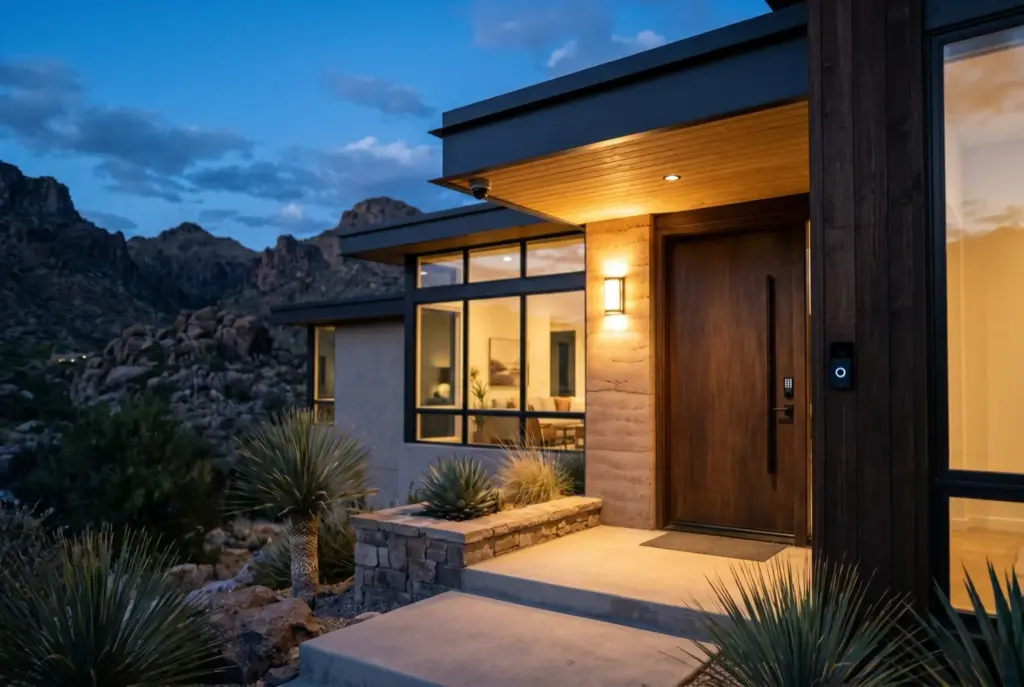
Host tip: Disclose in your house manual: “This property has an exterior doorbell camera at the front entrance that records video. No indoor cameras are present anywhere in the home.” Airbnb and Vrbo both require it. Most guests appreciate the transparency.
Where to Put Cameras at an STR (and Where Not To)
Coverage priorities for a typical vacation rental, in order:
- Front door / primary entrance. Doorbell cam. Non-negotiable.
- Driveway and parking area. Floodlight cam or PTZ unit. Captures vehicle counts, plates, and comings and goings.
- Any secondary entrance. Back door, side door, garage entry. Second camera minimum.
- Pool gate or pool equipment area (not the pool itself). Liability risk during off-season.
- Trash and utility areas. Catches illegal dumping and meter tampering.
Never point a camera at: pool decks, hot tub areas, outdoor showers, private patios, fenced back yards, or any space where a guest would be undressed or expect privacy. That is an Airbnb policy violation and in some states a criminal issue.
Disclosure Language for Your Listing and House Manual
Every platform requires this. Put it in both your listing description and your house manual. Keep it short and factual. Copy and paste the below and edit to match your property:
“This property has the following exterior security cameras: a video doorbell at the front entrance, and an outdoor camera covering the driveway. Both record video only (no audio) and cover outdoor areas only. There are no indoor cameras of any kind anywhere in this home.”
That one paragraph protects you on three fronts: it meets platform disclosure rules, it heads off the paranoid-guest review (“I felt watched”) before it happens, and it creates a written record in case of a future dispute.
What About Noise Monitors?
Noise monitors are a separate conversation. They are not cameras, they do not record audio or video, they sit indoors (which is allowed because they are not cameras), and they matter enormously for hosts in party-sensitive markets. Minut and NoiseAware are the two leaders. Neither is on Amazon, so no affiliate link here, but any serious STR host should know them. We will cover noise monitors in a dedicated post soon.
Frequently Asked Questions
Do I need a subscription for these cameras?
No. All five cameras above work without a subscription. Subscriptions add longer cloud storage, smarter motion detection, and richer AI features. REOLINK is the most subscription-light. Ring and Nest push hardest toward their paid tiers.
Can I include cameras in my STR insurance policy?
Specialty STR insurance carriers like Proper Insurance, Safely, and Steadily often discount premiums for documented security systems. A combination of cameras, smart locks, and a noise monitor can save enough on annual premium to cover the hardware. Call your carrier before buying and ask what they accept.
What if a guest damages or covers a camera?
Rare but it happens. All five cameras above send tamper alerts when they lose signal or are physically disturbed. Document the incident immediately through your platform’s resolution center, submit clear before-and-after photos, and claim damages against the guest’s security deposit or platform protection program.
Hardwired or battery for a rental?
Hardwired for any permanent rental. You do not want a cleaning crew pinging you because a battery died mid-stay. Battery only when hardwiring is genuinely not possible (remote cabins, non-owner-occupied installs, etc.), and then only with solar.
What about interior cameras in common spaces only?
Airbnb: no. Airbnb’s 2024 ban covers all interior cameras regardless of location or disclosure. Vrbo: technically allowed in common areas with disclosure, but you will take a review hit from privacy-sensitive guests. My recommendation is zero interior cameras on any platform.
Bottom Line
The single highest-leverage camera to buy for a short-term rental is the Google Nest Doorbell. It covers the highest-risk location, it is permanent, and the smart notifications are excellent.
For a host with one larger property or a portfolio starting to form, the REOLINK 16-channel PoE system is the best unified setup at its price point.
For a host who wants one very capable camera without a subscription, the REOLINK RLC-823S2 PTZ replaces several fixed cameras.
Buy fewer cameras, buy better ones, put them only where they belong. Disclose their presence clearly. Watch this whole category keep getting better, because the next wave of on-device AI is going to make every one of these cameras smarter without a software update.
Nedra’s disclaimer: We do our best to keep our tech reviews accurate and up to date, but products evolve fast and we are only human. Always verify current features and pricing directly with vendors before purchasing.